Dashboard and Navigation
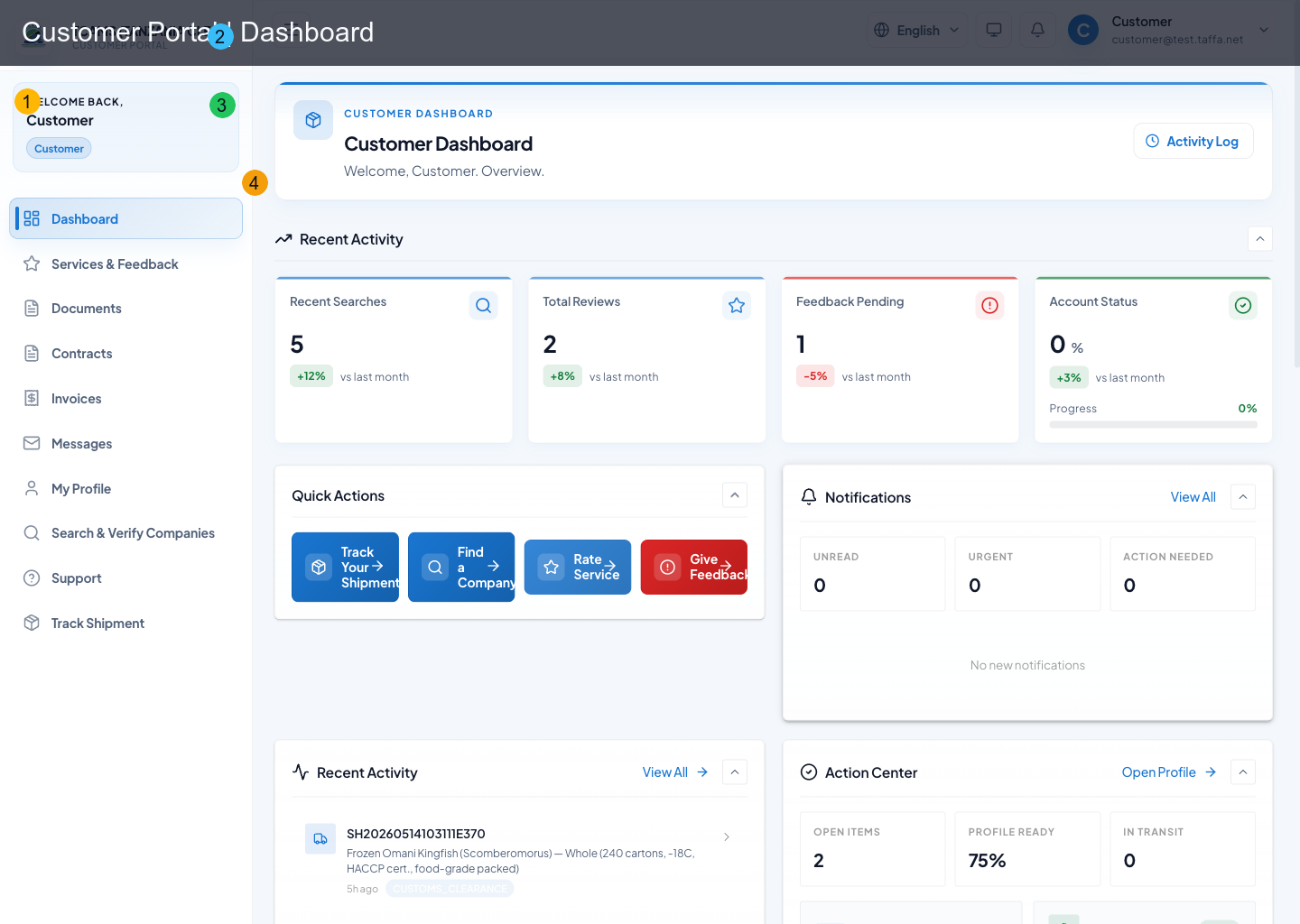
The dashboard is the operational home for customer users. It combines status summaries, alerts, and direct actions.
Sidebar Navigation
From the left sidebar, users can open:
- dashboard
- feedback/services
- documents
- contracts
- invoices
- messages
- profile
- search companies
- support
Header Controls
The top header provides global controls such as language, notifications, session/user menu, and portal utilities.
Dashboard Sections
The dashboard includes collapsible sections. Collapse state is remembered in browser storage per user.
Core sections:
- Activity overview: cards for searches, ratings, complaints, and support-resolution health. A comparison trend appears only when the API returns a real comparison period.
- Quick actions: direct shortcuts to search companies, rate service, and file a complaint
- Notifications snapshot: unread/urgent/action-needed metrics and latest alerts
- Recent activity feed: recent interactions across key modules
- Action center: next best actions for profile completeness, support, and feedback
Quick-Action Routing
| Action card | Destination |
|---|---|
| Find Company | /search |
| Rate Service | /rate (mapped into services & feedback) |
| Give Feedback | /complaint (mapped into services & feedback) |
Quick actions reflow into two columns in the standard desktop workspace and one column on narrow mobile screens. This keeps action names readable when the sidebar or another dashboard panel reduces the available width.
The support-resolution percentage is derived from resolved support activity. It is not an account-verification score. When there is no comparison-period data, the dashboard shows the current value without a placeholder increase or decrease.
Recommended Operator Habit
Start from dashboard each session:
- check unread notifications and action center
- review invoices, contracts, and messages
- clear pending feedback or support actions
Daily Dashboard Procedure
- Read the notification summary before opening a module. Prioritize items marked urgent or action required.
- Review time-sensitive invoices, contracts, and messages from your clearing agent.
- Review invoice or contract actions that can block release or service continuation.
- Check messages for questions from the clearing agent; keep replies tied to the relevant work item where possible.
- Use the action center to finish incomplete profile, document, feedback, or support tasks.
- Return to the dashboard and confirm that unread and pending counts changed after the work was completed.
Dashboard cards summarize data; they are not a substitute for the underlying record. Select the card or linked action to see identifiers, timestamps, status history, and available evidence before making a decision.
Navigation Behavior
The active sidebar item identifies the current workspace. On smaller screens, open the menu from the header and close it after choosing a destination. The sidebar can be collapsed on desktop; that preference is stored in the browser, so a different device may use a different layout.
When a notification opens a deep link, confirm the record identifier in the destination page before responding. Use the browser Back action only when no form is in progress. If you have unsaved changes, save or cancel them explicitly before leaving the page.
Empty, Loading, and Error States
- A loading indicator means the portal is still requesting data; avoid repeated clicks.
- An empty list can be valid when there are no linked records or the current filter excludes them. Clear search and filters before escalating.
- A permission message means the account is not allowed to perform that action; signing in again will not add a missing role.
- A temporary network error should be retried once after checking connectivity. If it repeats, record the page, time, record identifier, and visible error for support.