Access and Onboarding
Landing and Sign-In Entry
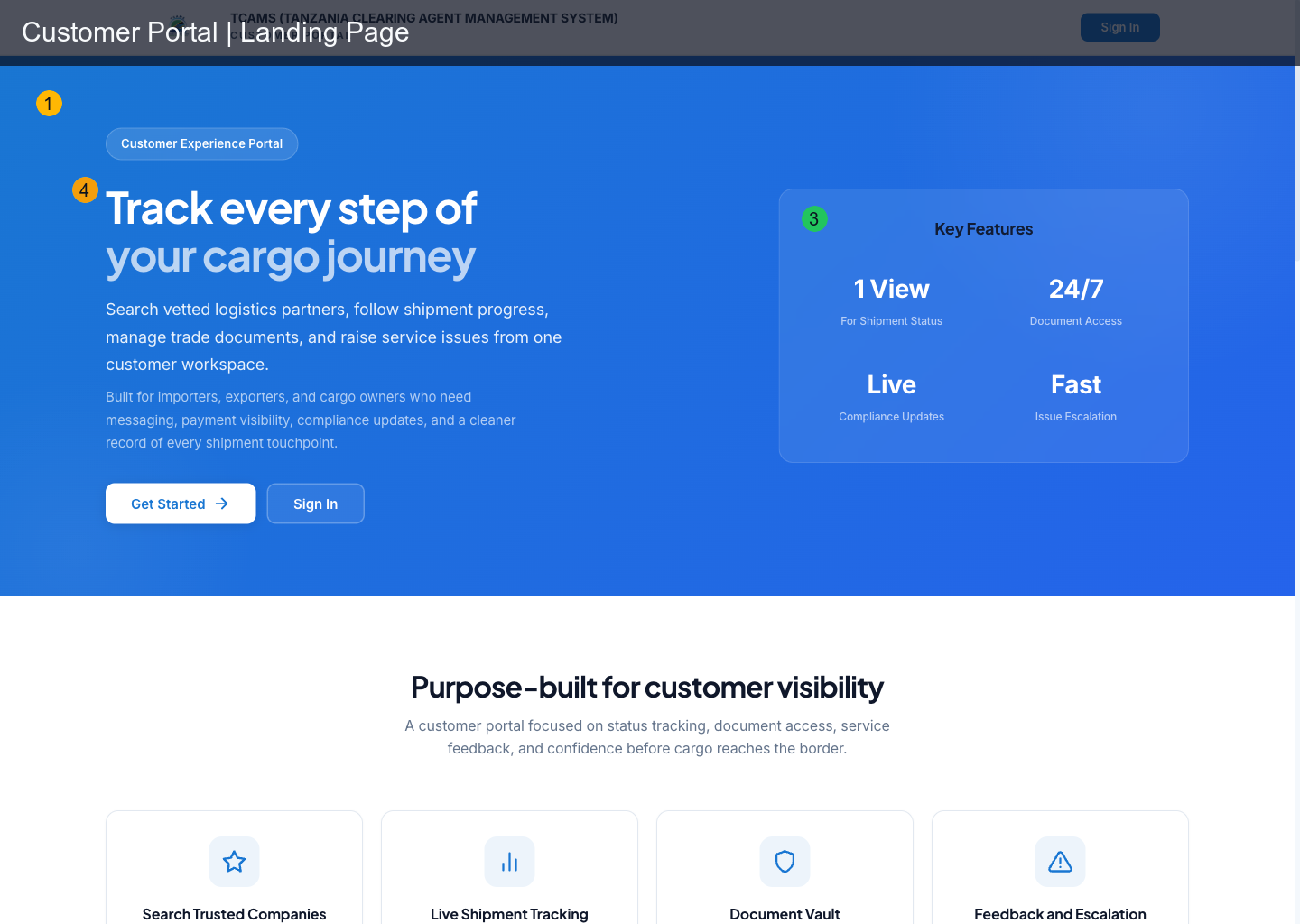
Use the landing page to start authentication. The primary action calls the portal login flow and returns users to the customer portal after authentication.
Sign-Up Behavior
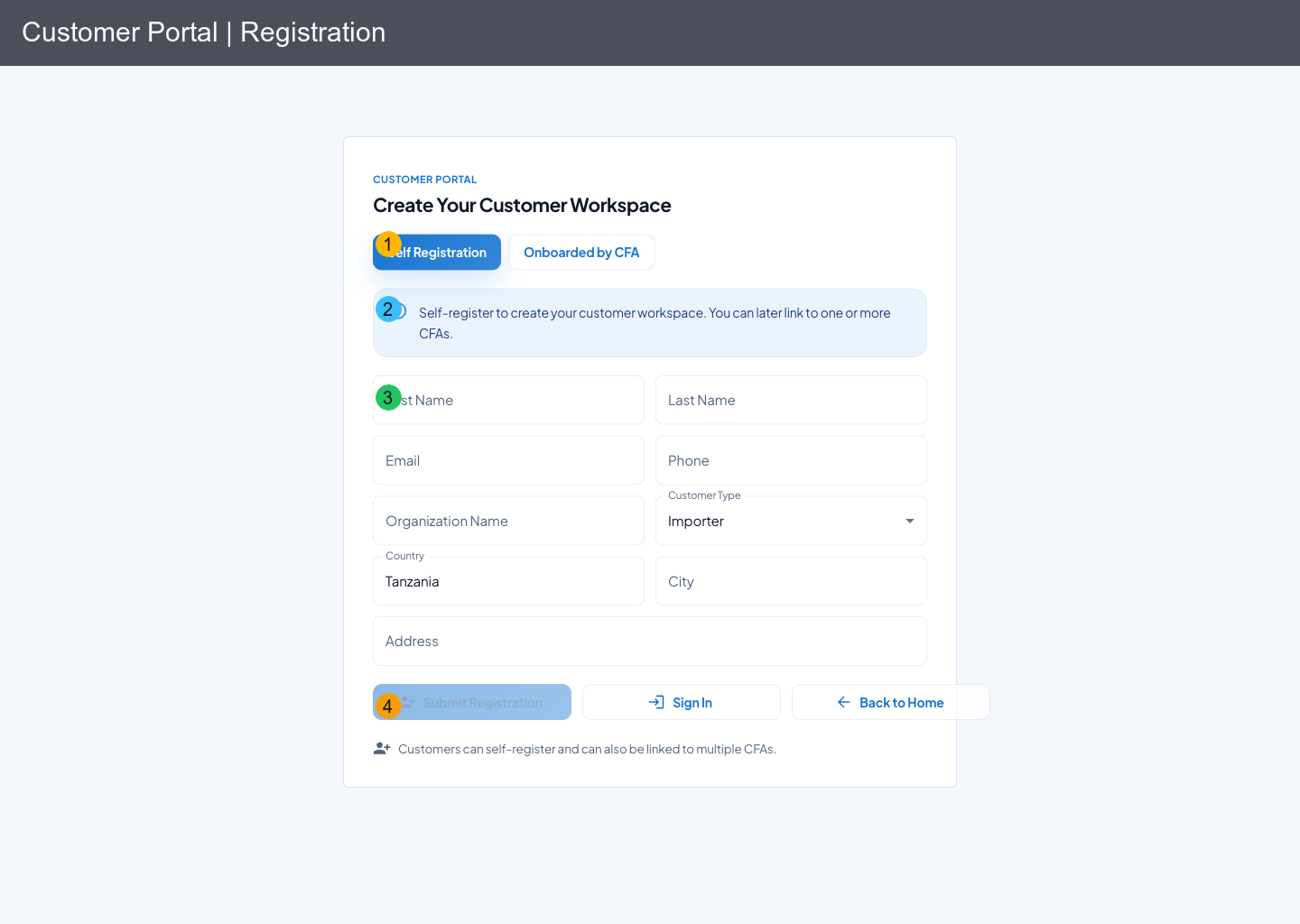
When users select Sign up from customer login, they are routed to the customer portal registration page (/register) instead of Keycloak's default registration screen.
The page supports two onboarding paths:
- Self Registration: customer submits profile details, receives email verification and password setup flow
- Onboarded by CFA: company/CFA admin creates or links the customer, then the customer receives onboarding email actions
Note
A customer can exist without a CFA link and can later be linked to one or more CFAs.
Customers are importers or exporters that may work with one or more clearing agents. After onboarding, a linked customer can exchange messages, receive invoices and contracts, rate completed services, and raise complaints.
Before You Register
Prepare a working email address, a phone number that can receive follow-up communication, your organization name, customer type, and normal operating address. Use an address that you control: verification and password-setup messages are part of the account recovery trail. Complete registration in one browser tab and avoid public or shared computers.
The public form asks for contact and organization details; it does not ask for a password. TCAMS sends identity setup through the configured authentication service after the registration is accepted. Never enter a password, one-time code, or passkey response into a support ticket.
Self-Registration Procedure
- Open the Customer Portal and select Get Started.
- Keep Self Registration selected.
- Enter your legal first and last name and the email address you will use to sign in.
- Enter your phone, organization name, and customer type.
- Confirm the default country or replace it, then enter city and address.
- Review spelling carefully—especially the email address—before selecting Submit Registration.
- Open the verification or account-setup email sent by TCAMS and complete the secure identity steps.
- Return to the Customer Portal, select Sign In, and complete your profile and notification preferences.
After submission, preserve the acknowledgement or reference shown by the portal. If no email arrives, check spam/junk folders and wait a few minutes before requesting support. Repeated registration attempts with the same email can be rejected as duplicates.
CFA-Onboarded Procedure
Choose Onboarded by CFA when a clearing agent has already created or linked your record. Use the identifier and email address supplied in the invitation, follow the displayed lookup instructions, and complete the secure email action. If the portal cannot find the invitation, ask the CFA to verify the exact email address and whether the invitation is still active; do not create a second customer identity just to bypass the mismatch.
Access Scope and Role Guard
Customer users are constrained to customer workflows only. If an active SSO session belongs to a user without customer-portal access, the app forces re-login so the user can switch account.
Session Basics
- the app checks SSO status at load
- token refresh runs automatically in the background
- expired/invalid refresh falls back to login
- registered passkeys can be used from the Keycloak login page as a passwordless sign-in option
Common Access Issues
| Symptom | Likely cause | Action |
|---|---|---|
| redirected back to login | user lacks customer-portal role in active SSO session | sign out and sign in with customer-authorized account |
| sign-up submission fails | validation error or duplicate email | correct input and retry, or use password-reset/verify-email flows for existing accounts |
| blank/blocked after auth | stale SSO callback params or expired session | refresh browser and retry login |
| passkey registration does not open browser prompt | unsupported browser/device or interrupted Keycloak required action | retry over HTTPS from a passkey-capable browser |
Successful Onboarding Checklist
- You can sign in without being redirected to another portal.
- Your name and organization appear correctly in Profile.
- At least one recovery method is available and your email is verified.
- Notification channels match how you want to receive invoice, complaint, and support updates.
- Any expected CFA relationship is visible; otherwise contact that CFA with your customer email and registration reference.