Association Finance, Reports, And LMS Guide
Use this guide for finance monitoring, reporting, and LMS governance.
1. Open Reports Workspace
- Open
Reportsin the association portal. - Choose
Business ReportsorLive Operations. - Set date range and generate export-ready reports.
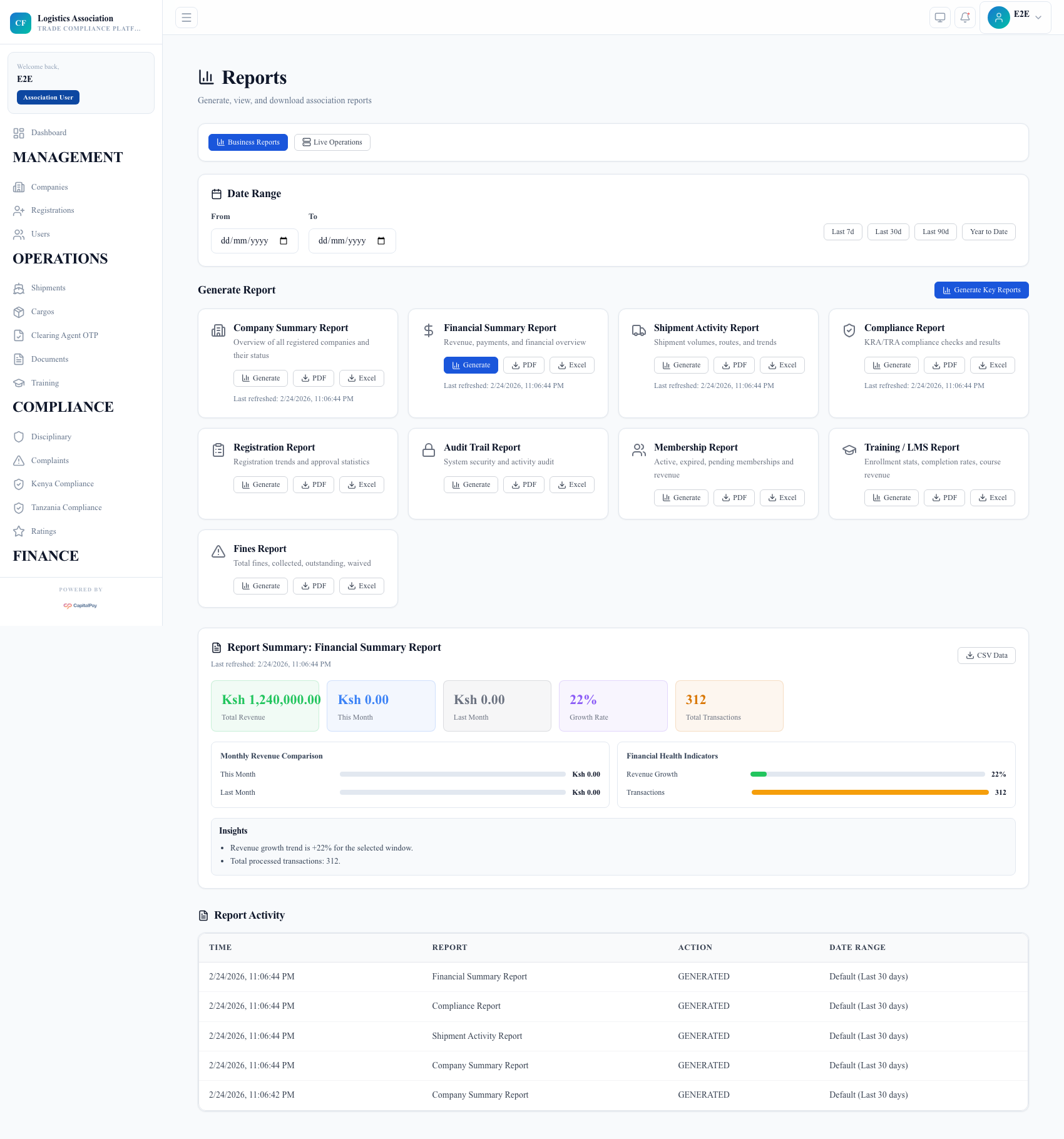
Step Checkpoint - Use as reference: The screenshot above (when provided) should match the state after completing these steps. - Expected result: report templates and activity list are available to operations and finance users. - If different: Refresh once, then use the troubleshooting guidance in this guide.
2. Generate Business Reports
- Select report type (company summary, registration, shipment activity, compliance, fines, LMS).
- Set date filters (
Last 7d,Last 30d,Last 90d,Year to Date). - Click
Generate, then export (PDF/Excel) where needed.
Step Checkpoint - Use as reference: The screenshot above (when provided) should match the state after completing these steps. - Expected result: generated reports appear in report activity and are downloadable. - If different: Refresh once, then use the troubleshooting guidance in this guide.
3. Monitor Live Operations
- Switch to
Live Operations. - Review operational dashboards and refresh interval.
- Use
Open Grafanafor deeper investigation when needed.
Step Checkpoint - Use as reference: The screenshot above (when provided) should match the state after completing these steps. - Expected result: operational metrics are visible for the configured environment namespace. - If different: Refresh once, then use the troubleshooting guidance in this guide.
4. Financial Oversight
- Review invoice and payment views from
FinancialandInvoices. - Track fines collection and outstanding balances.
- Compare finance trends with compliance and shipment activity.
Step Checkpoint - Use as reference: The screenshot above (when provided) should match the state after completing these steps. - Expected result: finance controls are centralized and audit-ready. - If different: Refresh once, then use the troubleshooting guidance in this guide.
5. LMS Governance
- Open
Trainingfor training oversight. - Track enrollment and completion status.
- Follow up on members where training is mandatory.
Step Checkpoint - Use as reference: The screenshot above (when provided) should match the state after completing these steps. - Expected result: LMS participation supports compliance readiness. - If different: Refresh once, then use the troubleshooting guidance in this guide.
6. Troubleshooting
- Report screen shows runtime auth/config error:
- re-authenticate and refresh;
- verify frontend runtime points to the correct API/Auth hosts.
- No data in reports:
- confirm date filters and activity volume for selected period.
Quick Reference
- Finance menus:
Financial,Invoices,Fines - Reporting menus:
Reports,Audit Logs - Training menu:
Training